Skip to content
EssentialSecurity, theme, and saved preferences.Always on

We do not send your name or email to affiliates.

Changelog

What is new in OutboundQA

Customer-facing improvements to launch checks, evidence, reports, monitoring, and the workflows around them.

Subscribe by RSS

Find an update by customer impact

Showing 18 updates

We checked the agencies who sell deliverability

Launch workflow

A first anonymous market report: 35 outbound agencies, one public sending domain each, and how many would pass their own pre-launch check.

Everybody in cold email has an opinion about how common broken infrastructure is. Nobody publishes a number, because publishing one means either naming companies or asking permission from the companies you would be naming.

The infrastructure readiness report is the number, without either problem.

The sample

35 organisations that sell cold email or outbound as a service. One publicly visible sending domain each. Three records that every receiver reads before deciding anything else: MX, SPF, and DMARC.

No customer data was used. No domain is named anywhere in the report.

What it found

40 percent were clean. Mail routing passed on every single domain, which is what you would expect from a check that breaks loudly and gets fixed. DMARC did not, and it accounts for most of the first blockers.

The pattern is the interesting part. The easy, noisy check is done everywhere. The quiet one that decides how a receiver treats the domain is the one left undone, including by the people selling deliverability as a service.

Anonymity is structural, not editorial

The published dataset holds counts only. Audited domains exist while the report generates and never reach the output, and the generator refuses to write a file that contains one. A market report that can be reverse-engineered into a list of broken companies is a different and worse product.

What it does not claim

Three public records on one domain is not a full audit. Inboxes, tracking hostnames, SMTP egress, and sender history are not visible from outside an organisation, and the report says so next to every number rather than in a footnote. A Ready result here is not a prediction that mail reaches the inbox.

There is also no trend line. This is the first run, and a second period is worth publishing when one exists.

The launch queue now ranks what just broke

Launch workflow

Fresh regressions and findings that survived the last two audits now change the order of the queue, and each row names the assets behind them.

A verdict tells you a workspace has a problem. It does not tell you whether that problem arrived an hour ago or three weeks ago, and those are not the same job. The workspace that just fell off Ready is usually the one to open first, and until now it looked identical to the one that has been sitting on Needs Fix since the start of the month.

The launch queue now ranks on two more signals, and both are visible on the row rather than folded into a score.

A verdict that just got worse

A workspace whose verdict degraded inside the last 72 hours carries a Regressed marker and sorts above workspaces on the same verdict that did not move. A new workspace leaving Unknown on its first audit does not count as a regression, because every workspace does that once and it means nothing.

A finding you have already seen

One failing check is a finding. The same check failing again on the next audit is a finding somebody has already read and not resolved, and that is worth ranking on. The row shows how many, and since when. A workspace with only one finished audit is excluded, because you cannot establish that something persists from a single observation.

The assets behind the row

Knowing which client to open still left you reading their asset list to find the actual problem. Each row now names the three assets carrying the most findings, blockers first, so the queue points at a fix rather than at a list.

Two new filters, Just regressed and Unresolved, narrow the queue to either signal on its own.

Still no hidden score

The ordering is published with the response and reads in plain terms: verdict, recent regression, live campaign, launching soon, active incident, unresolved root cause, asset risk, ownership, launch time, blast radius. Every factor that moved a row is named on that row. Nothing is weighted behind the scenes.

A client handoff deck agencies can fill in and send

Launch workflow

A three page pre-launch summary an agency edits in the browser and forwards to a client, with the verdict, what was checked, and what launching broken costs.

An agency that runs a pre-launch audit ends up with a report link. That is the right artifact for the person doing the work and the wrong one to forward to a client who did not ask for a tool.

The client handoff deck is three pages an agency puts their own name on and sends before the first send.

What it contains

Page one is what was checked: 75 checks across four asset types, with the counts per type and the sources they read. Page two is the verdict and the link to the full report. Page three is the argument for fixing first, written as consequences rather than invented statistics.

Edited in the browser, not generated for you

Four fields fill in across all three pages at once, and every value on the deck can be clicked and typed over. The verdict switcher rewrites the verdict block and the recommendation for Ready, Needs Fix, and Do Not Launch.

Nothing is uploaded. The deck is printed from the page, so a client name never leaves the machine it was typed on. A pre-rendered PDF with the placeholders left in is published alongside it for when an attachment is all you need.

What it still refuses to say

Page two carries the same limit the report does. A verdict describes how a domain is configured and what public reputation it carries. It is not a prediction of inbox placement, which also depends on list quality, message copy, volume, and mailbox provider behaviour that no public source exposes.

The free audit now hands you the message, not just the finding

Launch workflow

A verdict from the free audit can be copied as a client-ready message that states the finding and links back to a check the recipient can run themselves.

The free audit already produced a report on any domain from public records alone. What it did not do was help with the part that follows, which is writing to the person who owns the domain.

Results now sit under “Share this verdict with your client”, with two ways out.

The shareable link still carries the domain and nothing else. Opening it runs every check again, so what the recipient reads is true when they look rather than when you ran it. If they fixed something first, the report shows the fix.

The message, new

One click copies a message that states the findings plainly, counts only what is actually there, and ends with the same live link so the recipient can verify every claim themselves. It reads as evidence rather than as a pitch, because every line in it is checkable.

No badge from a free scan

When a domain passes every check, the panel says so and points at what the verified badge certifies. It does not issue one. A free audit reads public DNS for a domain nobody has proven they own, so a badge minted there would put our name on a claim we cannot stand behind, and would devalue the badge that a full audit earns.

A shareable record card for every verdict, not only the wins

Launch workflow

Any launch QA run now exports as a post-sized card showing the verdict, blockers, date, and a QR back to the report, with switches to redact the client.

The verdict badge is a trophy. It is issued only when a workspace clears, which is deliberate: a badge that could also mean Needs Fix would certify nothing.

That left a gap. Most QA runs are not clean, and the work of running one is worth showing whatever the answer was.

The receipt, not the trophy

The launch QA record card is issued for every verdict. It carries the verdict, the subject, how many checks ran, the open blockers and warnings, the date, and a QR code plus link back to the report behind it.

The captions are written to stay honest at every state. Ready reads “cleared launch QA”. Do Not Launch reads “is blocked from launch”. Neither pretends to be the other, and neither borrows the badge’s Verified or Cleared wording.

Sized for where it gets posted

Two sizes: 1200 by 627 for LinkedIn and X posts and link previews, and 1200 by 1200 for the square that fills more feed height. PNG or SVG.

Two privacy switches

Client names are not always yours to publish. Turning the name off redacts the subject to its shape, so the record is still readable as proof of work without identifying who it belongs to. Turning the link off drops the QR and the URL for a card that stays entirely internal.

Where it appears

On the launch report and on each per-asset report, next to the existing share link. The QR encoder is built in, so a card renders without calling out to anything.

One controlled next test for a delivery investigation

Launch workflow

Delivery Planning now recommends one evidence-based next test when the cause is still unconfirmed, without changing the launch verdict.

A delivery change rarely arrives with one obvious cause. Infrastructure can pass while placement changes, provider notices can overlap with a campaign change, and a message can use different hosts from the ones configured in the workspace. Testing everything at once makes the result harder to interpret.

Delivery Planning now recommends one controlled next test when the current workspace evidence does not confirm the cause. The recommendation includes the steps to run and the signal to look for before changing infrastructure or providers.

The next test follows the evidence

Depending on what the workspace already contains, OutboundQA can recommend one of five investigations:

  • Analyze one delivered .eml file to inspect the tracking and redirect hosts a recipient received.
  • Compare headers from controlled inbox and spam results.
  • Run a placement test while holding the sender, message, and send time constant.
  • Check mailbox provider status and account notices for the affected time window.
  • Confirm the public sending IP, then inspect its PTR, HELO, banner, and reputation evidence.

The same workspace evidence returns the same recommendation. If the evidence already confirms an infrastructure cause, the confirmed fix remains the next action instead.

One result narrows one layer

Each test has a clear stopping point. A host mismatch supports a message surface lead. A provider-specific placement pattern supports a placement lead. A failed sender identity check supports an infrastructure lead. A passing result clears only the layer tested and points to the next evidence class.

The investigation guide is read-only and workspace-scoped. It does not create an investigation record or change Ready, Needs Fix, or Do Not Launch. It also does not prove or guarantee inbox placement.

The cold email infrastructure scorecard

Launch workflow

Every launch check in one table: what breaks when it fails, which tool category covers it, and the eight that no category owns.

Most launch checklists are a list of records to publish. They tell you what to set up. They do not tell you what happens when one of them is wrong, and they do not tell you which of your existing tools would have caught it.

The cold email infrastructure scorecard is one page that answers both. Twenty-one checks, grouped into the three layers a launch actually passes through, with the failure consequence and the coverage state next to each one.

Three layers, not one list

Authentication asks whether the receiver trusts the domain. SPF, DKIM, and DMARC live here, and this layer is well served. Free lookups and DMARC platforms cover almost all of it.

Server identity asks whether the connecting server looks legitimate. Reverse DNS, forward confirmation, HELO alignment, and the SMTP banner. None of these are described by SPF, DKIM, or DMARC. A checklist that stops at authentication never reaches this layer.

Link layer asks whether the links survive the click. The tracking CNAME, the certificate behind it, and how long that certificate has left. Sending platforms create the record. They do not keep watching the certificate.

The eight nobody owns

Eight of the twenty-one rows have no established tool category behind them. They cluster in the second and third layers: whether PTR matches the expected host, whether it is a generic network name, whether HELO aligns, whether the banner matches, whether the tracking certificate is valid and has expiry headroom, whether the redirect chain is short, and whether the link domain carries a browser level warning.

That is the honest reason a clean sending dashboard and a passing placement test can both miss a launch blocker. They are answering different questions.

What it does not claim

The scorecard names three things no public infrastructure check can prove, including ours: per mailbox inbox placement, private sender reputation held by the receiver, and whether the message content earns replies. A scorecard that only lists what one product catches is an advertisement.

Take it with you

Two images are published alongside the page, one tall for community feeds and one wide for link previews. Both are free to repost.

Check a domain's sending history before you buy it

Launch workflow

A new burn history checker, a full outbound audit for any domain, and the option to be told when a result changes.

Every deliverability tool needs access before it can tell you anything. You connect a sending platform, or you send to a seed list, and only then does it have something to work with. That rules out the moment when the question matters most: before you have bought the domain, and before you have spoken to the prospect.

These three additions work entirely from public evidence, so they run on domains nobody has given you access to.

Domain burn history checker

Aged infrastructure is sold on the promise that history is on the domain’s side. Often the history is the problem. A domain can be registered years ago, sit unused, get bought for a single outbound run, burn, and land back on the market looking clean. Fresh registrations are not automatically safe either, because short outbound-shaped names get recycled constantly.

The domain burn history checker reads registry records, Certificate Transparency logs, live DNS, and public blocklists, then returns one of four verdicts with dated evidence behind each one.

  • Clean. No tracking hostname, no sending platform in SPF, no listing.
  • Previously sent. Configured to send before, with nothing listed against it. Not damaged, but not fresh.
  • Burnt. Prior sending plus active damage, a tracking hostname on a dropped domain, or mail configured on a domain where no website ever existed.
  • Unknown. Public sources did not return reliable evidence.

That last verdict matters as much as the others. A clean result requires positive evidence, never an absence of data, because a false clean is the expensive mistake here. When a source is unavailable we say so rather than clearing the domain.

Outbound audit for any domain

The outbound audit runs the full public-evidence pass and presents it as a report written for the person who owns the domain. Each finding carries the evidence, what the problem costs them, and how to fix it, instead of a record dump that only means something to an operator.

Every audit produces a shareable link. Opening it runs the checks again rather than loading a stored snapshot, so the report is true at the moment it is read. If the owner fixes something first, the link shows the fix. No findings about a third party are stored.

Be told when a result changes

DNS drifts, blocklists move, and records get overwritten by whoever touched the zone last. Every free tool result now offers to watch that domain and report when the result is no longer true, without setting up a workspace first.

What public evidence still cannot do

These checks describe how a domain is configured and whether it carries public reputation damage. They cannot see private sender reputation held by mailbox providers, complaint rates, list quality, or where a given message landed. A domain can pass every check here and still have a delivery problem.

Production evidence for monitoring controls

Reports and evidence

Continuous QA now distinguishes configured controls from real delivery, receiver, provider, timing, and cost evidence.

Continuous QA now keeps an auditable record of the production evidence behind its monitoring controls.

See what has produced fresh evidence

The workspace dashboard shows monitoring assurance for:

  • The latest completed full check and configured cadence.
  • DNS assets with stored change-detection baselines.
  • Email, Slack, and signed webhook destinations tested successfully in the last seven days.
  • DMARC aggregate reports and receiver-reported message volume from the last seven days.
  • Conclusive blacklist results tied to a named provider.

A configured destination or provider is not presented as tested until it returns real evidence. If the assurance endpoint is unavailable, the dashboard says so without changing the existing verdict or incident history.

Measure alert and verification timing

Operators can persist evidence from three reversible DNS drift and recovery drills plus one reversible non-DNS regression drill. OutboundQA calculates p50 and p95 change-to-alert and change-to-verification time from complete production samples only.

Incomplete samples remain available for investigation and do not enter the timing distribution.

Keep hourly monitoring economically accountable

The production readiness gate now attributes configured blacklist, reputation, Safe Browsing, and per-asset infrastructure costs to recent scheduled canary runs. It projects cost for 100 assets across a month of hourly checks, adds the monthly account allocation, and compares that result with the $79 Continuous QA price and the configured gross-margin floor.

Refunds, taxes, and unallocated labor remain separate operating costs.

The release adds the evidence collection and fail-closed gates. It does not claim that production drills have passed until the required provider deliveries, RUA traffic, drift, recovery, and timing samples are recorded.

Launch Report debrief and lifecycle proof

Reports and evidence

The $49 Launch Report now includes a findings debrief, a recovery sample, and durable product milestone tracking.

Launch Report now includes a 20-minute findings debrief after the first verdict. The purchase email explains how to request it, and pricing now presents the debrief as part of the one-time $49 offer.

See the complete proof trail

The anonymized sample now shows four distinct moments:

  • The baseline asset inventory captured before launch.
  • The blocker discovered by the first full check.
  • The remediation action taken by the operator.
  • Recovery confirmed by a fresh verification run.

The sample is explicitly a composite using reserved names. It is not presented as a customer testimonial or an inbox-placement guarantee.

Measure the paid journey without inflated counts

OutboundQA now stores a durable, deduplicated ledger for Launch Report purchase, first verdict, remediation return, verified recovery, report sharing, and Continuous QA activation. Provider retries, worker retries, and repeated share clicks do not create extra lifecycle milestones.

These milestones contain product IDs and operational classifications, not customer domains, inbox addresses, DNS values, or public report tokens.

Smartlead and Instantly imports, Gmail Postmaster evidence, client portal roles, additional DNS providers, and faster agency cadence remain ordered discovery work. They are not presented as shipped features.

Agency-owned reports and reliable DNS drift alerts

Reports and evidence

Continuous QA can present shared reports under the agency's identity, record public-open activity, and keep each DNS change tied to one incident.

The client-facing proof and the monitoring incident now stay owned by the team responsible for the launch.

Present the report under your agency identity

Continuous QA account owners can add an agency logo in Account settings. Shared reports then use the agency name and logo in place of OutboundQA branding.

An agency-branded report does not include an OutboundQA sales call to action. The client sees the launch verdict, evidence, and remediation record without a competing promotion in the report wrapper.

This opt-in changes the shared-report identity. It does not add a custom domain, custom colors, or a native PDF export.

The signed-in report view now shows:

  • Total public opens.
  • The first public-open time.
  • The latest public-open time.

The count includes repeat requests and automated link previews. It is not a unique-person count and does not identify the viewer. This keeps the activity useful as delivery evidence without presenting it as individual client analytics.

Keep one DNS change tied to one incident

Continuous QA uses both the complete hourly check suite and a focused DNS sentinel. A watched record can be observed by either path first.

The two paths now share exact-once dispatch. A confirmed MX, nameserver, SPF, DMARC, DKIM, CAA, root-resolution, or tracking-CNAME change is recorded once. Actionable drift is attached to one active incident and verified by a fresh full run.

DMARC paging follows the meaning of the change. Deletion, new invalid policy data, test mode, or weaker enforcement is critical. A strengthening change is retained in history without paging unless another check regresses.

A transient lookup error remains unknown. It does not replace the known baseline or create a false recovery.

Affiliate program foundation

Partners

OutboundQA now has consent-aware affiliate attribution, exact program terms, and a complete public starter kit.

OutboundQA now has a public affiliate program page for outbound consultants, agency operators, educators, communities, and creators who refer teams that need a defensible pre-launch decision.

What the program page explains

  • Approved partners earn 30% commission on eligible customer payments.
  • The partner dashboard is the source for referral, eligibility, and payout status.
  • Affonso credits the last eligible affiliate click before signup. OutboundQA locks that referral to the account at account creation and carries the same stable user ID into a trusted checkout session.
  • The application flow, partner fit, and ineligible referral types are shown before a visitor applies, so the page is easier to scan and attracts more relevant partners.

The public website and product use one versioned consent preference with separate Analytics and Affiliate controls. Optional tracking starts off. A visitor can accept all, reject optional tracking, manage each choice, or return to Cookie preferences later. Referral context can cross the website and app before a choice, then stops after explicit rejection.

Email and Google registrations now pass the same sanitized attribution. With Affiliate consent, each successful new registration uses Affonso’s documented browser signup API to record one lead. Existing-user sign-ins do not create a lead. Dodo receives the locked referral in checkout metadata and remains responsible for purchase, renewal, refund, and cancellation events, so revenue is never reported twice.

The join actions open the hosted Affonso portal from validated public build configuration. Placeholder IDs and an unapproved portal host fail validation. The generated website now preserves the pixel’s program and consent attributes, so referral visits create the cross-domain tracking ID instead of loading an unconfigured provider module.

Resources for partners who are ready to share

The new affiliate resources page provides product facts, proof links, channel-specific starting points, clear disclosures, objection handling, and promotion guardrails. It gives approved partners useful material without inventing social proof, earnings estimates, or deliverability guarantees.

The affiliate program now also has dedicated program terms, a hosted Affonso signup handoff, downloadable light and dark logo variants, a standalone mark, and landscape, square, and portrait social cards. SVG and PNG variants are available, and a generated starter kit bundles them for download. Affiliate resources are now the secondary action on the program page, replacing the sample report action.

The program is now discoverable from the main navigation and a focused partner section on the homepage. Educational links are grouped under Explore to keep the primary navigation readable, and program questions now go directly to viraj@outboundqa.com.

Affiliate terms now use the same open long-form legal layout as the Terms of Service and Privacy Policy. All three pages share one component, consistent breadcrumbs, dated metadata, section spacing, and related legal links. The shared layout now also includes a responsive section index, while the affiliate agreement presents the program economics in a compact review panel. The agreement clarifies Affonso’s role as the tracking and portal provider, OutboundQA’s responsibility for program and payout decisions, pending and approved commission states, payout dependencies, termination treatment, and the independent affiliate relationship. The general Terms and Privacy Policy now also identify Dodo Payments and Affonso by role, explain the consented signup and referral data used for events, and separate the payment record from affiliate commission records. Consent actions use the shared on-accent text token so their labels remain readable in both themes. The downloadable light and dark wordmarks are now optically centered inside their transparent canvases. Asset tests measure the visible artwork bounds so future PNG rebuilds cannot reintroduce uneven side padding.

The logo kit now uses the exact proportions of the approved standalone mark in every wordmark, favicon, install icon, and social asset. The Dodo integration also supports its documented metadata_affonso_referral parameter when a configured payment link is used. The obsolete custom Affonso API credential and undocumented server event path have been removed.

The public program now states the complete economics: $14.70 on an eligible $49 Launch Report purchase and $23.70 for each eligible $79 Continuous QA month, with a 30-day attribution window, 30-day review hold, $50 payout threshold, and monthly PayPal payouts. Referred buyers do not receive a discount. The Launch Report includes the existing 20-minute findings debrief.
Cleaner incident evidence and the complete check catalog

Reports and evidence

DNS-change alerts now present policy drift in operator-readable form, and the public catalog now reflects all 75 check types available across the full infrastructure workflow.

Continuous monitoring is useful only when an alert explains what changed without making the operator decode internal data.

Read DMARC changes as policy evidence

DMARC monitoring stores a structured snapshot of the applicable policy so it can detect more than a TXT-value change. DNS-change alerts now turn that snapshot into a concise before-and-after view showing:

  • The governing DMARC record.
  • The effective policy.
  • The DNS name that supplied the policy.
  • Test mode or invalid policy data when present.

A removed policy is shown as a deleted record. Internal structured data no longer appears in the customer email.

See the full infrastructure catalog

The public check catalog now matches the versioned API contract: 75 unique check types across sending domains, inboxes, tracking domains, and SMTP egress paths.

The expanded catalog makes shipped checks visible, including MX connectivity and TLS, SPF syntax, live DMARC receiver evidence, Safe Browsing status, sending-IP blacklist status, and inbox-native probes. Conditional checks run only when the workspace includes the required asset or evidence.

Make the paid workflow easier to evaluate

The homepage and free-tools index now distinguish a one-off browser lookup from paid launch QA. Free tools inspect one signal. Paid QA connects the workspace, groups related failures into one remediation action, records a shareable launch verdict, and watches the approved baseline after launch.

These changes do not add an inbox-placement guarantee. Unknown evidence remains unknown, and optional receiver or placement evidence stays separate from the deterministic launch verdict.

Inspect the tracking surface of a real sent email

Launch workflow

Upload one sent .eml to compare observed tracking and redirect hosts with the custom tracking domain in a workspace.

Infrastructure checks tell you whether the configured tracking domain resolves, points to the expected destination, and serves valid HTTPS. A sent message can still load an open pixel or route a click through a different host.

OutboundQA now adds optional message-surface evidence to Delivery Planning. Send yourself one test email, save it as a .eml file, and upload it to the workspace. The preflight identifies tracking pixels and redirect hosts it can observe, then compares them with the tracking domain already configured for that workspace.

The result shows the configured tracking hosts that appeared in the message, external hosts that need review, and any recognizable sending-provider evidence. It does not require a mailbox password, a sending-platform connection, or DNS access.

The original message, recipients, headers, and body are discarded after analysis. OutboundQA retains only normalized host-level findings.

Message-surface evidence remains separate from Ready, Needs Fix, and Do Not Launch. It is an observed signal, not proof of why a receiver chose a folder or an inbox-placement outcome.

Preview and apply eligible Cloudflare DNS fixes

Launch workflow

Exact TXT, CNAME, and CAA fixes can now move from evidence to a confirmed Cloudflare change with audit history, verification, and guarded rollback.

OutboundQA can now apply eligible Cloudflare DNS fixes without turning every finding into a manual copy-and-paste task.

Preview before writing

For an exact TXT, CNAME, or CAA fix, an account owner can provide a Cloudflare API token restricted to the affected zone. OutboundQA reads the current record and presents the mutation as a before-and-after preview.

The token is used for that request and is never stored by OutboundQA.

Reject stale or ambiguous changes

A preview expires after ten minutes. Apply stops when the record changed after preview, the existing record is ambiguous, the proposed value is incomplete, or the token resolves to a different zone.

OutboundQA does not automatically change DKIM records without a provider-issued key, PTR records, registrar settings, or blacklist status. Those actions remain provider-guided.

Verify and preserve evidence

After Cloudflare accepts the change, OutboundQA stores the operation’s before-and-after evidence and queues a fresh deterministic check. A guarded rollback remains available for 30 minutes while the live record still matches the applied change.

Production operations also gained a beat-to-worker heartbeat, a machine-readable readiness gate, configurable nightly canary workspaces for synthetic provider coverage, and dated delivery verification for email, Slack, and signed webhook destinations.

Continuous launch control and delivery diagnostics

Launch workflow

A portfolio launch queue, evidence-led delivery diagnostics, complete hourly monitoring, and severity-routed alerts now connect pre-launch QA with ongoing operations.

OutboundQA now carries launch evidence beyond a one-time domain check. Agencies can prioritize launch risk across client workspaces, investigate the most likely failure domain, and keep the same deterministic checks running after launch.

Control launches across the client estate

The Launch Queue brings client workspaces into one operational view. It orders work by launch verdict, live campaign exposure, active incidents, ownership, launch timing, and evidence freshness.

Each row shows the visible blast radius, including affected assets, mapped campaigns, daily sending volume, provider context, and unacknowledged incidents. Filters isolate live campaigns, blockers, incidents, stale evidence, and unowned work without hiding unknown risk.

When multiple affected clients share a mailbox or sending provider, OutboundQA surfaces the correlation as a triage signal. It does not present that correlation as proof of a provider-wide failure.

Diagnose the right failure domain

Delivery Planning separates likely causes into infrastructure, mailbox provider, recipient or list, content or placement, and unknown. Each category states the evidence behind it and what OutboundQA can and cannot prove.

The workflow now includes:

  • Recipient-domain CSV preflight with free-mail share, provider distribution, missing MX, and gateway evidence.
  • Mailbox-provider records for activation, incidents, suspensions, and replacement history.
  • An estate view across domains and inboxes, including age, provider mix, verdicts, and incident history.
  • A volume planner that makes its domain, mailbox, and ramp assumptions explicit.
  • Placement-test attachments that stay separate from the deterministic infrastructure verdict.

This avoids treating every deliverability decline as a DNS problem and avoids presenting planning guidance as a guarantee of inbox placement.

Watch the complete check suite every hour

Continuous QA now polls the complete deterministic check suite hourly. Critical and warning alerts route after confirmed detection according to each destination’s threshold, while informational findings remain in history and summaries instead of interrupting operators.

Alert settings now support severity-specific email and Slack routing, configurable portfolio summaries, and signed JSON webhooks. Recovery events use the same incident history so teams can see when a launch blocker was resolved.

Hourly polling is not event-driven real-time DNS monitoring. Public timing language remains “checked hourly; alerted after detection” until production drills establish a measured alert-time percentile.

Make verdicts and fixes easier to act on

Workspaces can require DMARC enforcement when a monitor-only policy is not acceptable for launch. Remediation guidance preserves the difference between a missing first-time DKIM selector and deletion of a previously observed key.

Dashboard fixes now start collapsed, diagnostic evidence is deduplicated, report lists include portfolio summaries, and filtered Launch Queue views keep their navigation context. DMARC remediation also rejects malformed percentage values instead of carrying invalid syntax into a suggested DNS record.

OutboundQA continues to use Ready, Needs Fix, and Do Not Launch as the primary decision. A readiness percentage provides supporting context without replacing the evidence-backed verdict.

DMARC policy discovery, reporting, and monitoring

Reports and evidence

DMARC checks now follow the current DNS discovery model, explain policy behavior across subdomains, validate report routing, and watch the policy that actually applies.

DMARC problems are often hidden behind a record that looks valid at first glance. A policy can be inherited from a parent domain, weakened for a subdomain, limited to a portion of traffic, or pointed at a reporting address that receivers will not use.

This update makes those conditions visible in the launch check and in ongoing monitoring.

Find the policy that actually applies

OutboundQA now follows the RFC 9989 DNS Tree Walk when it evaluates a DMARC policy. When a sending domain does not publish its own record, the check can find the applicable parent policy while keeping DNS lookups bounded.

The result explains:

  • Whether the policy is published directly on the sending domain or inherited.
  • The domain and DNS zone that own the governing record.
  • Invalid or duplicate DMARC records that receivers discard.
  • The requested policy and the policy that receivers effectively apply.
  • The difference between a monitoring policy, quarantine, and reject.

Fix guidance now targets the DNS zone that contains the governing record. When a scoped record is the safer fix, the guidance calls that out instead of suggesting an edit in the wrong zone.

See how subdomains are covered

DMARC can apply different handling to existing and nonexistent subdomains. OutboundQA now evaluates the root policy alongside sp and np settings, including DMARC test mode.

This catches a common gap: a root domain can enforce DMARC while a subdomain policy still permits impersonation. The check reports the affected scope and gives the exact tag to change.

Make reporting routes verifiable

Aggregate reports are useful only when receiving mail systems can deliver them. The DMARC reporting checks now:

  • Validate rua destinations and retain malformed values as evidence.
  • Distinguish a mailbox in the policy domain from an external reporting service.
  • Verify the DNS authorization required for third-party report destinations.
  • Preserve existing report destinations when adding the optional OutboundQA monitoring address.
  • Target the exact policy record when generating a DNS fix.

This reduces the chance that a domain appears monitored while aggregate reports are silently discarded.

Interpret newer and legacy policy settings clearly

The policy check now separates current behavior from older record fields that remain in wide use. It recognizes staged test mode, identifies obsolete pct, reporting interval, and URI-size settings, and suggests a migration that keeps the intended rollout behavior clear.

Alignment readiness and BIMI prerequisites also use the effective policy, so a policy that looks enforcing but is reduced by test mode is not presented as stronger than it is.

Monitor policy drift, not only one TXT value

Continuous QA now stores the applicable DMARC policy as a structured snapshot. Monitoring detects changes to the governing record, inherited source, effective policy, subdomain behavior, test mode, and malformed or duplicate-record state.

Existing monitoring data upgrades quietly on its first structured observation, so this change does not create a false alert for an unchanged domain.

Accept current aggregate-report formats

The aggregate-report parser now accepts both existing namespace-free XML and current RFC 9990 XML. It records policy discovery metadata, nonexistent-domain policy, and testing state while safely ignoring extensions that do not change the launch evidence.

These checks still assess public configuration and receiver-visible evidence. They do not guarantee inbox placement.

Clearer fixes, stronger reports, and SMTP egress checks

Reports and evidence

Related issues now resolve as one action, evidence is easier to follow, SMTP egress checks cover more of the sending path, and reports stay tied to the right workspace.

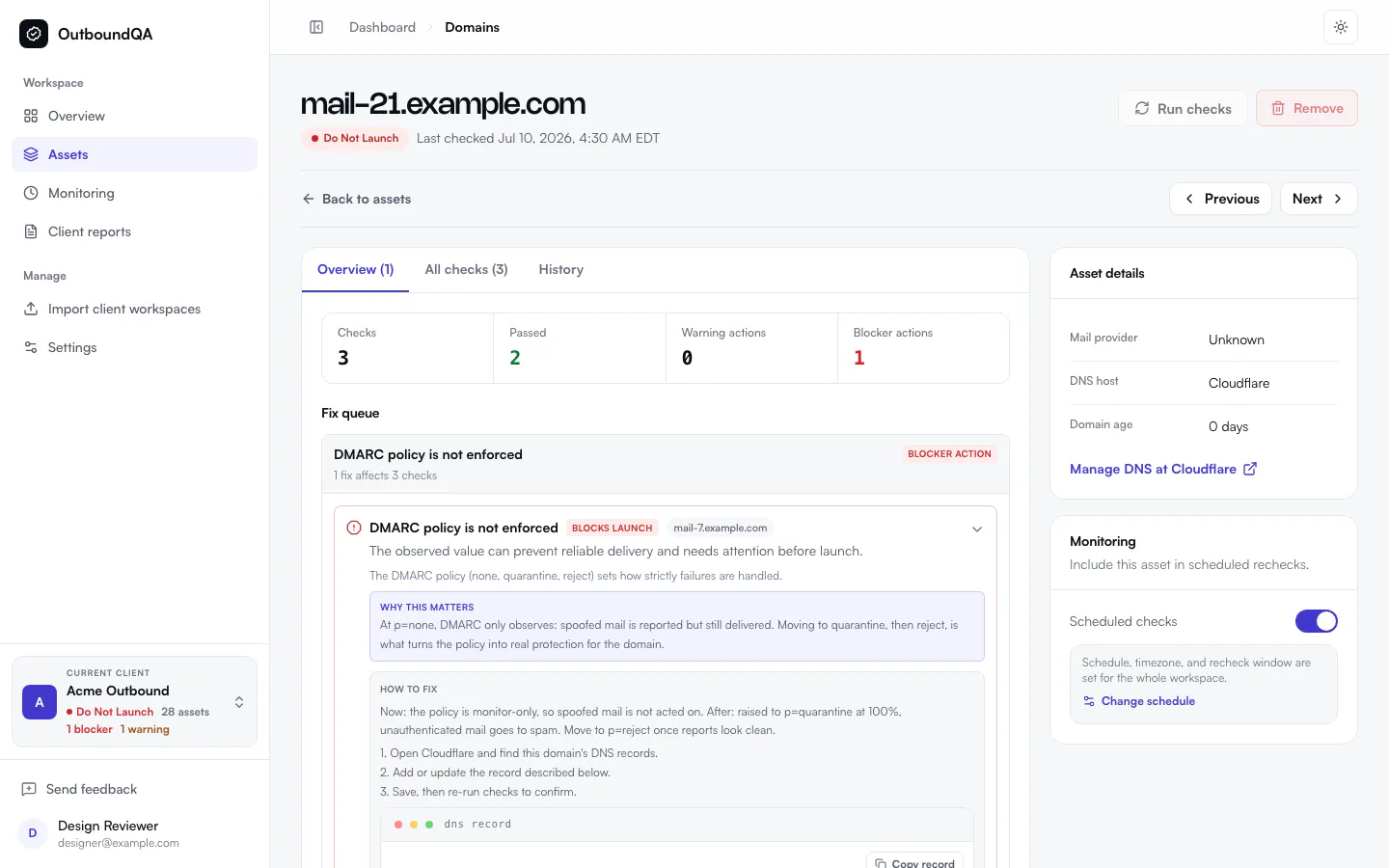
OutboundQA asset detail showing a grouped remediation action with evidence and the exact DNS fix
Related check failures now lead to one clear remediation action.

The difficult part of launch QA is rarely finding one failed check. It is turning several related failures into one safe action that an operator can complete without guessing.

This update makes that path clearer across evidence, remediation, reports, and the sending infrastructure OutboundQA can inspect.

Fix the root problem once

Related failures are now grouped into one remediation action. If a missing DNS record explains several downstream failures, OutboundQA shows the primary fix first and keeps the related evidence attached to it.

Each action explains:

  • What is broken.
  • Why it changes the launch verdict.
  • Which assets are affected.
  • The exact record or configuration to change.
  • Which checks should clear after the fix.

This reduces duplicated work and makes rechecks easier to interpret.

Evidence that leads to an action

Check results now use the available evidence more directly. DNS records, provider expectations, blacklist findings, and sender requirements are presented in formats that match the problem instead of falling back to a generic evidence block.

Passing checks can also include advisory guidance when there is a useful next step that does not change the verdict.

Check the SMTP egress path

Workspaces can now include SMTP egress assets. OutboundQA checks the public identity of the sending path, including PTR and reverse DNS, forward-confirmed reverse DNS, HELO alignment, generic cloud hostnames, and the live SMTP banner when it is reachable.

These checks do not predict inbox placement. They make a previously hidden part of the launch infrastructure visible before sending starts.

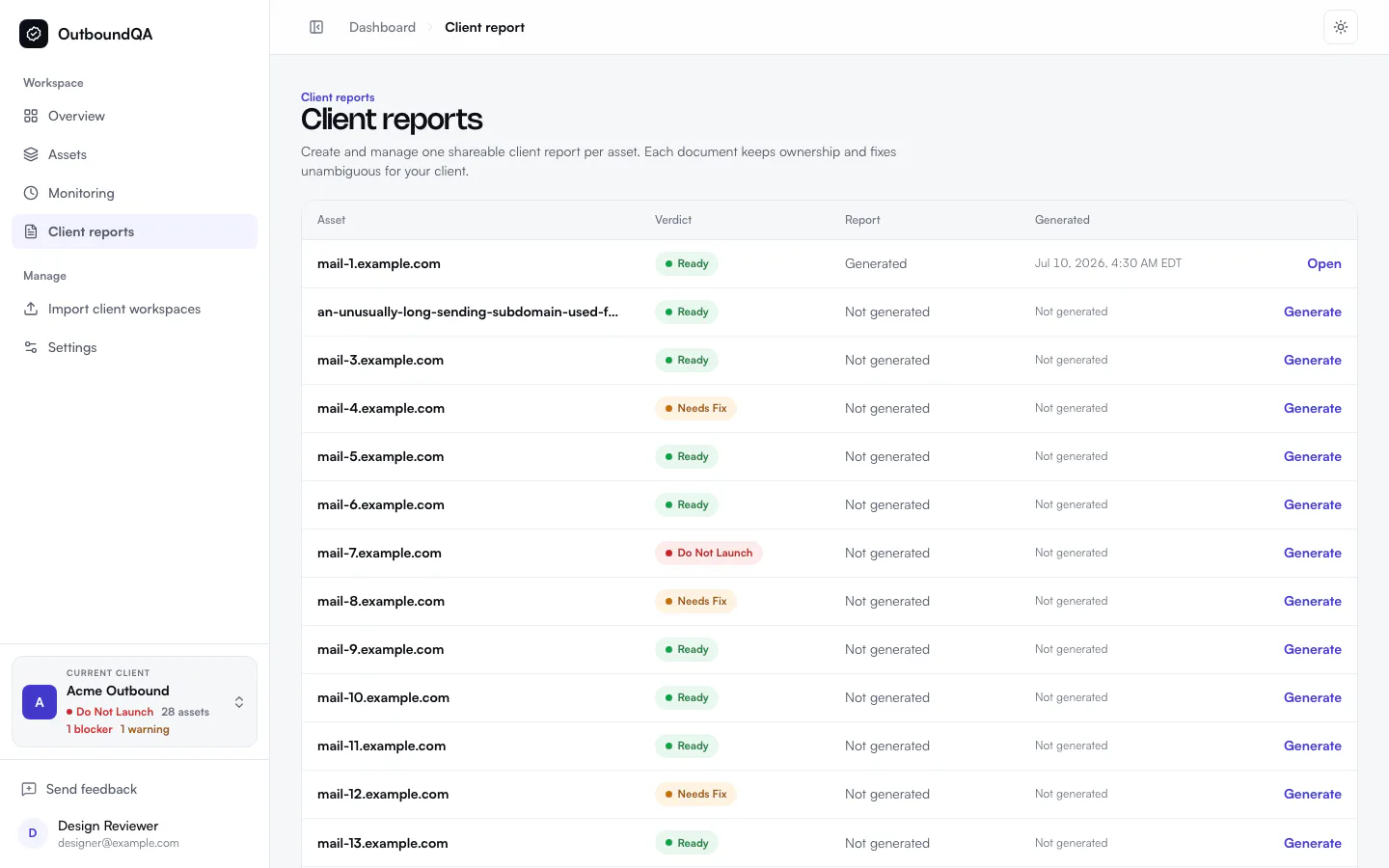
OutboundQA workspace report showing a launch verdict, issue counts, and assets included in the report
Reports stay scoped to the active workspace and summarize the evidence behind the verdict.

Reports and notifications are easier to trust

Report generation and navigation now stay scoped to the active workspace. SMTP assets appear alongside domains, inboxes, and tracking domains, and the report flow gives clearer feedback when generation is still running.

Notification settings now separate operational preferences from delivery destinations. OutboundQA also warns when alerts are enabled but no active destination can receive them.

Smaller improvements

  • Team invitations and invite acceptance are available from account settings.
  • DNS changes appear in workspace History alongside monitoring activity.
  • Workspace and plan usage are easier to see from the app sidebar.
  • Asset navigation, empty states, and feedback reporting are clearer on mobile and desktop.

Every change in this roundup has the same goal: move from a failed check to a verified fix with less interpretation in between.