Scorecard
Cold email infrastructure scorecard
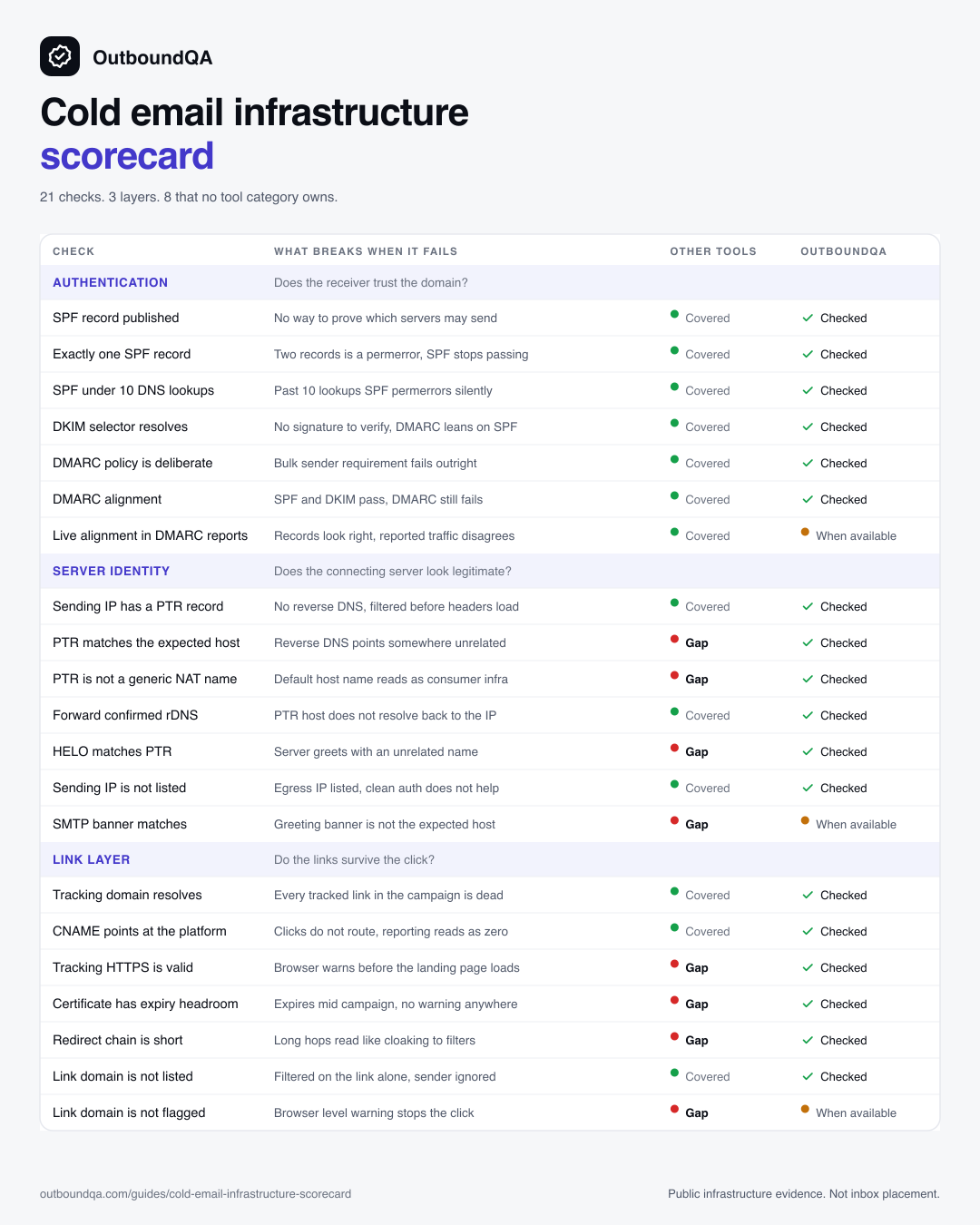
21 checks that decide whether an outbound setup should launch, in one table. What breaks when each fails, which tool category covers it today, and whether OutboundQA catches it. Save it, post it, argue with it.
21
checks across three layers
8
have no established tool category
3
things no check can prove
Layer 01
Authentication
Does the receiver trust the domain?
SPF, DKIM, and DMARC tell a receiver that mail claiming to come from the domain really did. This layer is well served by free lookups and DMARC platforms, and it is the only layer most launch checklists cover.
SPF record published
spf_exists
What breaks
Receivers cannot confirm which servers may send for the domain, and the Google and Yahoo bulk sender rules fail on the first requirement.
Tool category
Manual diagnostics, authentication management
OutboundQA
Checked on every run.
Exactly one SPF record
spf_multiple
What breaks
Two SPF records is a permanent error. SPF stops passing entirely, so DMARC loses one of its two ways to align.
Tool category
Manual diagnostics
OutboundQA
Checked on every run.
SPF under 10 DNS lookups
spf_lookup_count
What breaks
Past 10 lookups SPF returns a permanent error. The record still reads correctly in a text editor, which is why this one survives review.
Tool category
Manual diagnostics, authentication management
OutboundQA
Checked on every run.
DKIM selector resolves
dkim_selector
What breaks
There is no signature for receivers to verify, so DMARC has to lean entirely on SPF alignment and any forwarding breaks it.
Tool category
Manual diagnostics, authentication management
OutboundQA
Checked on every run.
DMARC policy is deliberate
dmarc_policy
What breaks
A missing record fails the bulk sender requirement. An accidental p=none tells receivers to do nothing when authentication fails.
Tool category
Authentication management
OutboundQA
Checked on every run.
DMARC alignment
dmarc_alignment
What breaks
SPF and DKIM can both pass while the visible From domain aligns with neither, so DMARC still fails and the sender looks forged.
Tool category
Authentication management
OutboundQA
Checked on every run.
Live alignment in DMARC reports
sender_auth_live_alignment
What breaks
The published records look correct while real reported traffic tells a different story about which sources actually align.
Tool category
Authentication management
OutboundQA
Requires routed DMARC aggregate reports, at least 50 reported messages, and known sending-IP evidence.
Layer 02
Server identity
Does the connecting server look legitimate?
SPF, DKIM, and DMARC authenticate the domain. None of them describe the machine that opens the connection. A checklist that stops at authentication never looks at this layer, and no tool category owns most of it.
Sending IP has a PTR record
smtp_ptr_exists
What breaks
The connecting IP has no reverse DNS at all. Many receivers reject or heavily filter before they read a single header.
Tool category
Manual diagnostics
OutboundQA
Checked on every run.
PTR matches the expected host
smtp_ptr_expected
What breaks
Reverse DNS resolves to a hostname unrelated to the sender, so the connection does not corroborate anything the domain claims.
Tool category
No category covers this
OutboundQA
Checked on every run.
PTR is not a generic NAT name
smtp_ptr_not_generic
What breaks
A default hostname from the network provider reads like consumer or compromised infrastructure rather than a managed sender.
Tool category
No category covers this
OutboundQA
Checked on every run.
Forward confirmed rDNS
smtp_forward_confirmed
What breaks
The PTR hostname does not resolve back to the same IP, so the identity is unverifiable and receivers treat it as unowned.
Tool category
Manual diagnostics
OutboundQA
Checked on every run.
HELO matches PTR
smtp_helo_ptr_alignment
What breaks
The server greets receivers with a name unrelated to its reverse DNS. Authentication passes and the connection still reads as untrustworthy.
Tool category
No category covers this
OutboundQA
Checked on every run.
Sending IP is not listed
smtp_ip_rbl
What breaks
The egress IP is on a blacklist. Mail is blocked no matter how clean SPF, DKIM, and DMARC are on the domain.
Tool category
Manual diagnostics, warmup and monitoring
OutboundQA
Checked on every run.
SMTP banner matches
smtp_banner_probe
What breaks
The greeting banner the receiver sees does not match the host the sender expects to present.
Tool category
No category covers this
OutboundQA
Requires an SMTP host on the asset and outbound SMTP probing to be enabled.
Layer 03
Link layer
Do the links survive the click?
Authentication can look clean while link tracking breaks reputation or click routing on day one. Sending platforms create the tracking record. They do not keep watching the certificate behind it.
Tracking domain resolves
tracking_resolves
What breaks
Every tracked link in the campaign is dead. The message arrives and nothing in it can be clicked.
Tool category
Sending
OutboundQA
Checked on every run.
CNAME points at the platform
tracking_cname
What breaks
The record resolves to the wrong target, so clicks do not route or attribute and the reporting looks like nobody engaged.
Tool category
Sending
OutboundQA
Checked on every run.
Tracking HTTPS is valid
tracking_https
What breaks
The recipient sees a browser security warning before the landing page. That costs the click, the reply, and the measurement.
Tool category
No category covers this
OutboundQA
Checked on every run.
Certificate has expiry headroom
tracking_ssl_expiry
What breaks
A certificate that expires mid campaign turns every link into a warning screen, and nothing in the sending platform announces it.
Tool category
No category covers this
OutboundQA
Checked on every run.
Redirect chain is short
tracking_redirect_chain
What breaks
Long or cross owner hops between the click and the landing page read like cloaking to security filters.
Tool category
No category covers this
OutboundQA
Checked on every run.
Link domain is not listed
tracking_rbl
What breaks
The tracking domain is on a URI blacklist, so the message is filtered on the link alone regardless of the sending domain.
Tool category
Manual diagnostics
OutboundQA
Checked on every run.
Link domain is not flagged
tracking_safe_browsing
What breaks
The tracking host carries a browser level warning, which stops the click in the browser rather than in the inbox.
Tool category
No category covers this
OutboundQA
Requires the Google Safe Browsing provider to be configured.
What no infrastructure check can prove
A scorecard that only lists what one product catches is an advertisement. These three are outside what public evidence can establish, including ours. Any tool that claims otherwise is guessing.
Inbox placement per mailbox
Where a message lands depends on the recipient, their filters, and their history with the sender. Public DNS evidence cannot observe any of it. Placement tests sample one mailbox at one moment.
Private sender reputation
Receiver side reputation is held by the receiver. Public data can show blacklist state and observable history. It cannot read the score a mailbox provider keeps.
Message content and offer
Copy, targeting, and list quality decide whether a technically correct campaign gets replies. Infrastructure QA answers whether the setup should launch, not whether the pitch works.
Why the gaps sit where they sit
Sending, placement testing, and launch QA answer different questions. The uncovered rows are the ones that fall between those questions, which is why a clean dashboard and a passing placement test can both miss them.
Sending platform
Smartlead, Instantly
Builds sequences, rotates mailboxes, and runs campaigns.
Can the campaign send?
Placement test
GlockApps, Mail-Tester
Samples where a specific test message lands.
Where did this message land?
Independent launch QA
OutboundQA
Checks the workspace infrastructure and records the decision.
Should this setup launch?
Run the rows yourself
Most rows in the first layer have a free tool behind them. The uncovered rows are the reason the workspace check exists.
SPF Checker
Look up a domain's SPF record and count its DNS lookups against the limit of 10.
Open tool DMARCDMARC Checker
Look up a domain's DMARC record and read its policy in plain English.
Open tool DKIMDKIM Checker
Look up a domain's DKIM selector and confirm the public key exists.
Open tool LINKTracking Checker
Check a branded cold email tracking domain for CNAME setup, DNS resolution, HTTPS, and redirect handoff.
Open tool PTRPTR/rDNS Checker
Check a custom SMTP egress IP for PTR, reverse DNS, and forward-confirmed rDNS before launch.
Open toolFor the long form version of each record, read the infrastructure guides. For the step by step launch sequence, read the pre-launch checklist.
Questions
A single table of 21 public infrastructure checks, grouped into three layers: authentication, server identity, and the link layer. They are drawn from the 75 type catalog OutboundQA runs, narrowed to the checks a launch is most often blocked by. Each row names the failure consequence and the tool category that covers the check today.
SPF, DKIM, and DMARC authenticate the domain. They say nothing about the server that opens the connection or the certificate behind the tracking links. Grouping the checks by layer makes it visible that a clean authentication section still leaves two layers unverified.
8 of the 21 rows have no established tool category. They cluster in server identity and the link layer: expected PTR match, generic reverse DNS names, HELO alignment, SMTP banner, tracking certificate validity, certificate expiry headroom, redirect chain shape, and link domain Safe Browsing status.
No. Public infrastructure evidence establishes whether the setup is configured correctly and whether anything blocks a launch. It cannot observe per mailbox placement, receiver side reputation, or whether the message content earns replies.
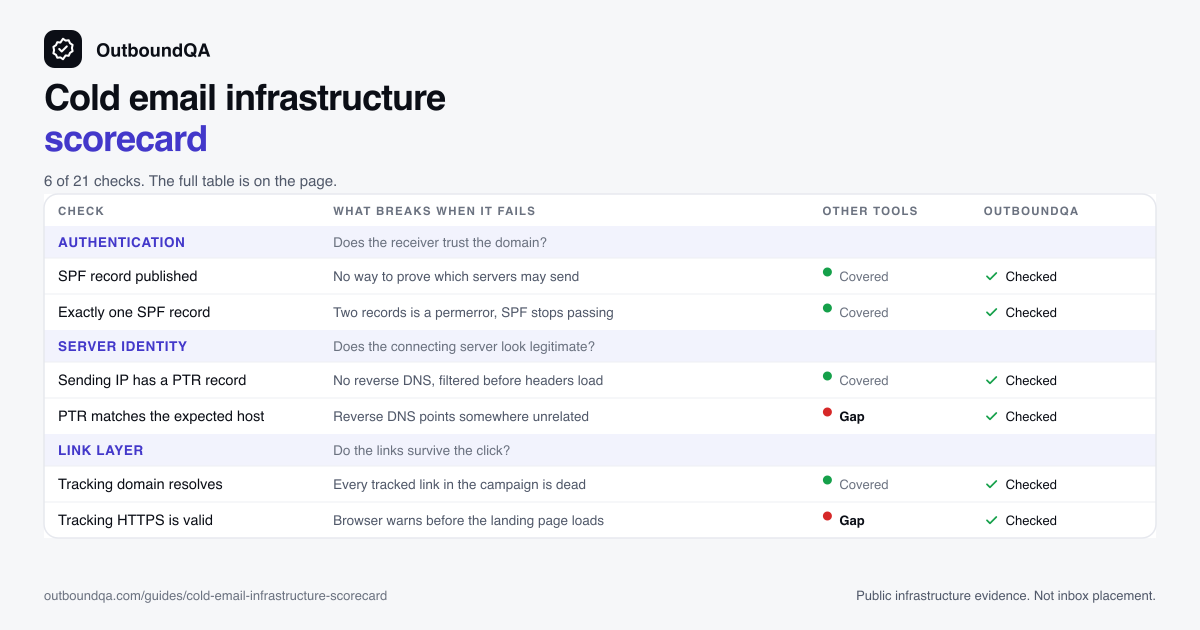
Yes. The page links two ready to post images, one tall for community feeds and one wide for link previews. Reposting them is fine.
Run the whole scorecard on your workspace
Add the domains, inboxes, tracking domains, and sending IPs. Get a Ready, Needs Fix, or Do Not Launch verdict with the exact fixes, and a report you can hand to a client.